How to Fix Microsoft RDP “Digitally Signed” Warnings (April 2026)
Posted on 1 May 2026 by Beaming SupportSince the April 2026 security update was released, Remote desktop connections have now started displaying a new warning whenever an RDP file is opened.
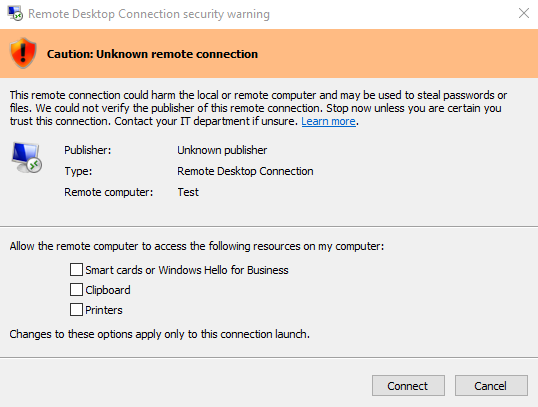
With this specific warning it will not let you save the access in the tick boxes which can be annoying for users who access multiple RDP sessions. This warning means that the RDP file has not been digitally signed which means it doesn’t know who has made it and where it has come from.
To sign the RDP file, it requires a certificate to be placed in the trusted root folder on the local computer if the RDP connects to a terminal server the certificate would need to be created on it and applied to the local machine. The trusted root is the directory which your operating system treats as inherently trustworthy.
However, if it is connecting to another computer or more personal uses, you can self-sign an icon by creating a certificate locally. Once the RDP file has been signed it will allow you to save the access to resources on the local computer and will give a slightly different warning and will say who the publisher of the file is.
The reason Microsoft introduced these protections was due to threat actors distributing malicious RDP files that silently redirected victims’ sessions and exposed local drives, clipboard data and authentication tokens.
Our growing knowledge base
Dive into our expertise in connectivity, cyber security and all things tech.

This content is brought to you by the Helpdesk Support Team, who provide the backbone for our specialist UK internet service provider.
Being part of this technical-led ISP, the team is committed to constantly sharing their practical, expert advice on reliable connectivity, troubleshooting, and cyber security to help UK organisations maintain secure and smooth operations.